Fast, offline speech to text
NVIDIA Parakeet turns speech into text on your Mac, usually in about a second. It runs on Apple silicon, with no internet needed after setup.
Double-tap ⌥ Option, talk, and your words appear wherever you're typing: Mail, Messages, Word, your browser. It runs entirely on your Mac, so nothing you say is ever uploaded.
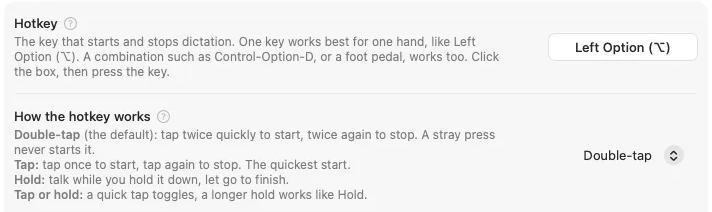
Option is just the default. Prefer another key, a middle or side mouse button, or a foot pedal? Pick your own hotkey in Settings.
Animation: Left Option is tapped twice, a small "Oli is listening" indicator appears while someone talks, then their words are typed into an email: "Hi Sam, running ten minutes late. Save me a seat by the window? Thanks!"
OliType only goes online to download a model (the speech model during setup, and AI cleanup if you add it), when you activate or remove your license or install an update, and, unless you turn it off in About, to check olitype.com for a newer version.
You already know two of them.
An email, a message, a document, a search box. Anywhere you'd type.
A soft chime plays and a small "Oli is listening" indicator appears. Speak normally.
Your words appear right where you were typing. Read them, then send when you're ready.
A single press of Option does nothing, so using Option in other apps won't start it by accident. Prefer Tap, Hold, a different key, a mouse button, or a foot pedal? Change it in Settings.
One finger is enough.
OliType was built so dictating takes one key, one click, or one press of a foot pedal, whether you type with one hand or two. Settings and Help work with the mouse alone.
When I broke my arm playing softball, I realized typing with one hand was going to be a challenge. I tried Apple's built-in dictation, but it kept getting my words wrong, and the tools that did better wanted a monthly subscription. I wanted dictation that was accurate, worked with one key, and kept my voice on my Mac. So I built the one I would want to use. I hope it helps you too.
NVIDIA Parakeet turns speech into text on your Mac, usually in about a second. It runs on Apple silicon, with no internet needed after setup.
English, Spanish, French, German, and 21 more, detected automatically as you speak.
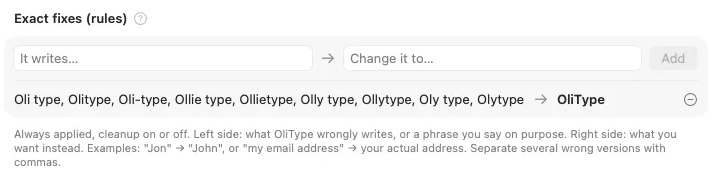
Exact fixes correct a word every time: when OliType hears "Jon", it types "John". Names & terms help the optional AI cleanup spell people and places your way.
Every dictation is kept as text on your Mac, so you can find and copy it again. Keep it forever, for a while, or not at all.
Press Esc once and nothing is typed. Changed your mind? The recording waits in History for a day, and Restore brings your words back.
The listening indicator, the floating button, and OliType's messages are left out of macOS screenshots and screen recordings, and out of screen shares in apps that respect macOS's window privacy setting. The words you dictate still show, because they're typed into your app.
A free add-on: a small AI writer that runs on your Mac (16 GB of memory or more) and polishes punctuation and false starts. Not installed by default; add it in Settings any time, and once added it's on. If it ever changes a number or rewrites too much, OliType types your exact words instead.
OliType never presses Return or Send. You always get to read your words first.
Plain words, no jargon.
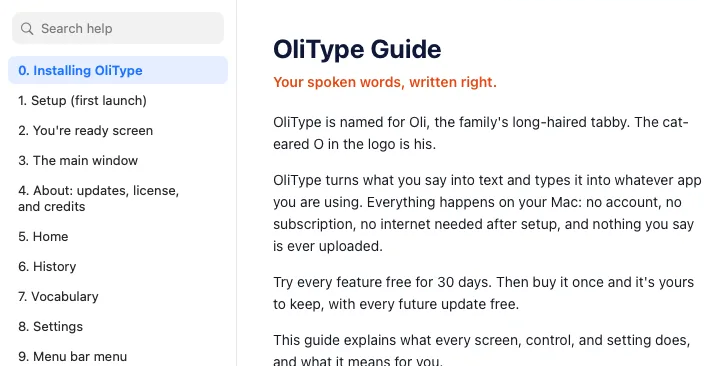
Every setting explains itself, and the whole guide is built in, so help works offline too.
Then it's yours to keep.
The free trial is the full app: every feature, for 30 days, no account and no card. If OliType earns a place on your Mac, buy it once. No subscription, and every future update is free.
$19 once
For 1 Mac
Buy OliTypeTry it free for 30 days first.
$29 once
Desktop, laptop, and one more
Buy for up to 3 MacsTry it free for 30 days first.
$9 once
Students, K-12 teachers, and college faculty · 1 Mac
Email support@olitype.com from your school address (no school email? Write anyway), and we'll reply with your discount code.
We email your code right away. No school email? Send it anyway and we'll check and reply within 2 business days. Prefer email? support@olitype.com
OliType 1.0.9, released October 12, 2026
Subscription prices from each company's own site, checked October 12, 2026. Both also have free plans; the comparison pages explain what they include.
30 days free · Every feature, nothing held back · No credit card · No account

OliType is named for Oli, our family's long-haired tabby. The ears on the O in the icon are his, and the little indicator says Oli is listening while you talk.
Good questions, straight answers.
Try every feature free for 30 days, no account and no card. Then buy it once: $19 for 1 Mac, or $29 for up to 3 Macs. Students, K-12 teachers, and college faculty pay $9 for 1 Mac: email us from your school address, or from any address if you don't have one. Buying for a team? Email us about bulk licenses. No subscription, and every future update is free.
Yes. Parents, partners, schools, and rehab or disability counselors often buy it for the person who will use it. Buy with the email you want to manage the license: the key arrives in that receipt email. Send the key to the person using OliType, and they paste it into About > License on their Mac. Buying for an organization? At checkout, tick "I'm purchasing as a business" and enter the organization's name (and tax ID, if it has one). Receipts stay at polar.sh/olitype/portal under the buyer's email, and that's where a Mac can be freed if the user replaces theirs. For several people, email support@olitype.com about bulk licenses.
Dictation pauses until you enter a license key. Your History, Vocabulary, and Settings keep working, and nothing is lost.
All sales are final, which is why the trial is the full app for 30 days. If something goes wrong after you buy, email support@olitype.com and we'll look at it.
Sign in at polar.sh/olitype/portal, our payment partner Polar's customer page, with the email you bought OliType with. You'll get a one-time code by email. There you can see your key, download receipts, and free a Mac you no longer have. Inside OliType, About > License > Find My License Key opens the same page. Stuck? Write to support@olitype.com.
Yes. In About > License on the old Mac, click Remove License from This Mac (nothing else on that Mac changes), then enter your key on the new one. If the old Mac is gone, remove it at polar.sh/olitype/portal. Moving from 1 Mac to 3? Pay only the $10 difference: email support@olitype.com. Need more Macs than that? Email us too.
No. Your voice is turned into text on your Mac, and the text goes straight into the app you are using. OliType has no telemetry, no accounts, and no cloud AI. It goes online only to download a model (the speech model during setup, and AI cleanup if you add it), when you activate or remove your license or install an update, and, unless you turn it off, to check olitype.com for a newer version. Dictation itself works with Wi-Fi off.
Yes. After the one-time speech model download during setup, dictation works with Wi-Fi off. OliType goes online only to download a model (the speech model during setup, and AI cleanup if you add it), when you activate or remove your license or install an update, and to check for updates unless you turn that off.
Many dictation apps send your audio to a server to be turned into text. OliType does that work on your Mac, so your voice is never uploaded, it works offline, and there is no account or subscription. See how it compares with Wispr Flow.
A Mac with Apple silicon (M1 or newer) running macOS 15 or later, with about 1 GB of free storage space (about 3.5 GB with AI cleanup). Intel Macs are not supported. Dictation runs fine on 8 GB of memory. The optional AI cleanup add-on needs 16 GB of memory or more, because its writing model loads into memory while it works. To check your Mac, open the Apple menu and choose About This Mac: look at Chip, macOS, and Memory. Memory is not the same as storage space.
25 languages, detected automatically as you speak: Bulgarian, Croatian, Czech, Danish, Dutch, English, Estonian, Finnish, French, German, Greek, Hungarian, Italian, Latvian, Lithuanian, Maltese, Polish, Portuguese, Romanian, Russian, Slovak, Slovenian, Spanish, Swedish, and Ukrainian.
It works almost anywhere you can type: Mail, Messages, Word, Google Docs in your browser, Slack, Notes, and more. OliType pastes your words where you're typing. If you're not in a text box, your words wait on the clipboard so you can paste them yourself.
Yes. OliType types by pasting into whatever box has your cursor, so it works in Google Docs and Slack (in the browser or their apps), in code editors like VS Code, and in Terminal. If your cursor isn't in a place that accepts text, your words wait on the clipboard.
No. OliType is for live dictation: you talk, and it types into the app you're using. It doesn't open audio or video files or record meetings.
OliType uses NVIDIA Parakeet, a speech model that runs on your Mac. Accuracy depends on your voice, your microphone, and the room; a headset or a quiet room helps. If it keeps getting one word wrong, add an exact fix in Vocabulary. If it often mishears your English, try Parakeet V2 in Settings. The 30-day free trial is the best way to see how it does with your voice.
macOS uses the Accessibility permission for two things OliType needs: noticing your hotkey while you are in another app, and typing your words into that app for you. (Microphone is a separate permission, used only between start and stop.)
Yes, that was the point. The default hotkey is a double-tap of Left Option, one key at the bottom-left of your keyboard. You can switch to Tap, Hold, or Tap or hold, pick any key or a middle or side mouse button, or record a USB foot pedal as your hotkey. A floating Dictate button and the menu bar icon do everything the hotkey does.
A free, optional add-on: a small AI writing model (about 2.3 GB) that runs on your Mac, never online. It removes false starts, keeps only your correction when you change your mind, fixes punctuation, follows cues like "new paragraph", and spells your names your way. Most people do fine without it, and if it ever changes too much or alters a number, OliType types your exact words instead.
Apple's dictation is good for quick notes. OliType adds a hotkey you choose (any key, a mouse button, or a foot pedal) with four ways to use it, a floating Dictate button, a searchable history of everything you've said, Restore for a dictation you cancelled, exact fixes for the words it gets wrong, and an optional AI cleanup that removes false starts. Try both during the free trial and keep what works for you. See the side-by-side comparison.
Never. OliType never presses Return or Send. You always get to read your words first.
Press Esc once (or click Cancel) and nothing is typed. The recording waits in History for a day, so you can click Restore and get your words back.
OliType is made by Bishop Technology Solutions, LLC. Speech recognition is NVIDIA Parakeet, and the optional AI cleanup model is Qwen 3. Both run on your Mac. See the Credits page for the main parts OliType runs on; every license is included in the app: click Licenses… in About.
Not today. OliType is made for the Mac.
Everything else is in the OliType Guide.
Still have a question? Contact us.
Private by design. Set up in a few minutes. Free for 30 days, no card needed.
Try it free for 30 daysA Mac with Apple silicon (M1 or newer) · macOS 15 Sequoia or later